BLUEROCK

Repair · installation · commercial service

Web Design for Garage Door Companies

Separate urgent repair from planned installation, collect useful equipment context, and make confirmation clear without diagnosing a moving system from a form.

Start Your Website

First-screen routing

  1. 01 · Repair or installation?
  2. 02 · Residential or commercial?
  3. 03 · Door, opener, or access system?
  4. 04 · What is observed?
  5. 05 · Request, dispatch, measure, or bid?

A stuck door and a planned replacement should not enter the same conversation.

Repair requests

Collect whether the door is open, closed, stuck, uneven, noisy, damaged, disconnected, or not responding; vehicle and property access; observed parts; recent events; safety concerns; location; and contact context without diagnosing the cause.

Replacement and installation

Clarify residential or commercial property, opening count and approximate size, existing door, style and material interests, insulation, windows, hardware, opener, access, approvals, timing, and the need for measurement.

Openers and access systems

Separate opener repair, replacement, controls, remotes, keypads, smart features, gates, loading equipment, and other genuinely supported work by compatibility, inspection, electrical boundaries, and authorization.

Commercial and property accounts

Route facilities, warehouses, multifamily, retail, associations, builders, operators, and portfolios by equipment, location count, access, operating hours, procurement, documentation, maintenance, and responsible contacts.

Trust comes from verified operating facts—not urgency banners and borrowed badges.

Jobs with context

Connect approved images to door or equipment type, property, scope, company role, observed condition, installed system, options, constraints, and appropriate location detail.

Verified trust only

Publish licenses, insurance, training, certifications, dealer or manufacturer relationships, warranties, years, reviews, awards, and memberships only from current approved records.

Real coverage and availability

State genuine service areas, supported request types, hours, after-hours process, dispatch boundaries, travel, property limits, and current capacity. Do not manufacture urgency or duplicate cities.

Request is not dispatch

Make confirmation explicit. A submitted form does not establish safety, diagnosis, technician availability, arrival time, scope, price, authorization, warranty coverage, or an emergency response.

Collect context without asking the customer to investigate an unsafe system.

  • 1Residential, multifamily, commercial, industrial, association, builder, property-management, or other supported account context
  • 2Door, gate, opener, dock, access control, or other supported equipment; approximate size, count, material, configuration, brand and model only when known
  • 3Open, closed, stuck, crooked, off track, noisy, damaged, unresponsive, intermittent, impacted, weather-affected, or another observation—not a diagnosis
  • 4Vehicle trapped or exposed, people or pets nearby, broken glass, visible loose parts, unsafe movement, property security, and whether the visitor can avoid operating the system
  • 5Address or service area, access instructions, parking, loading, tenants, operating hours, responsible contact, preferred timing, and communication needs
  • 6Photos or video only through an approved consent, privacy, retention, access, and professional-review workflow

Keep request, confirmation, inspection, authorization, and service distinct.

  1. 01

    Request

    The customer provides property, equipment, observed condition, access, safety, location, timing, and contact context.

  2. 02

    Review

    The company checks service and territory fit, urgency handling, availability, information gaps, and the appropriate next step.

  3. 03

    Confirm

    The real workflow confirms whether a call, appointment, dispatch, measurement, inspection, bid, or other response has been accepted.

  4. 04

    Inspect

    A qualified person evaluates the equipment, condition, attachments, balance, movement, controls, access, safety, compatibility, and scope.

  5. 05

    Authorize

    Options, scope, parts, assumptions, exclusions, price, schedule, warranty, changes, and terms are presented and approved appropriately.

  6. 06

    Service and close

    Work, testing, documentation, payment, warranty information, maintenance guidance, and follow-up match actual operations.

Original design study

See how safe intake and clear confirmation become an interface.

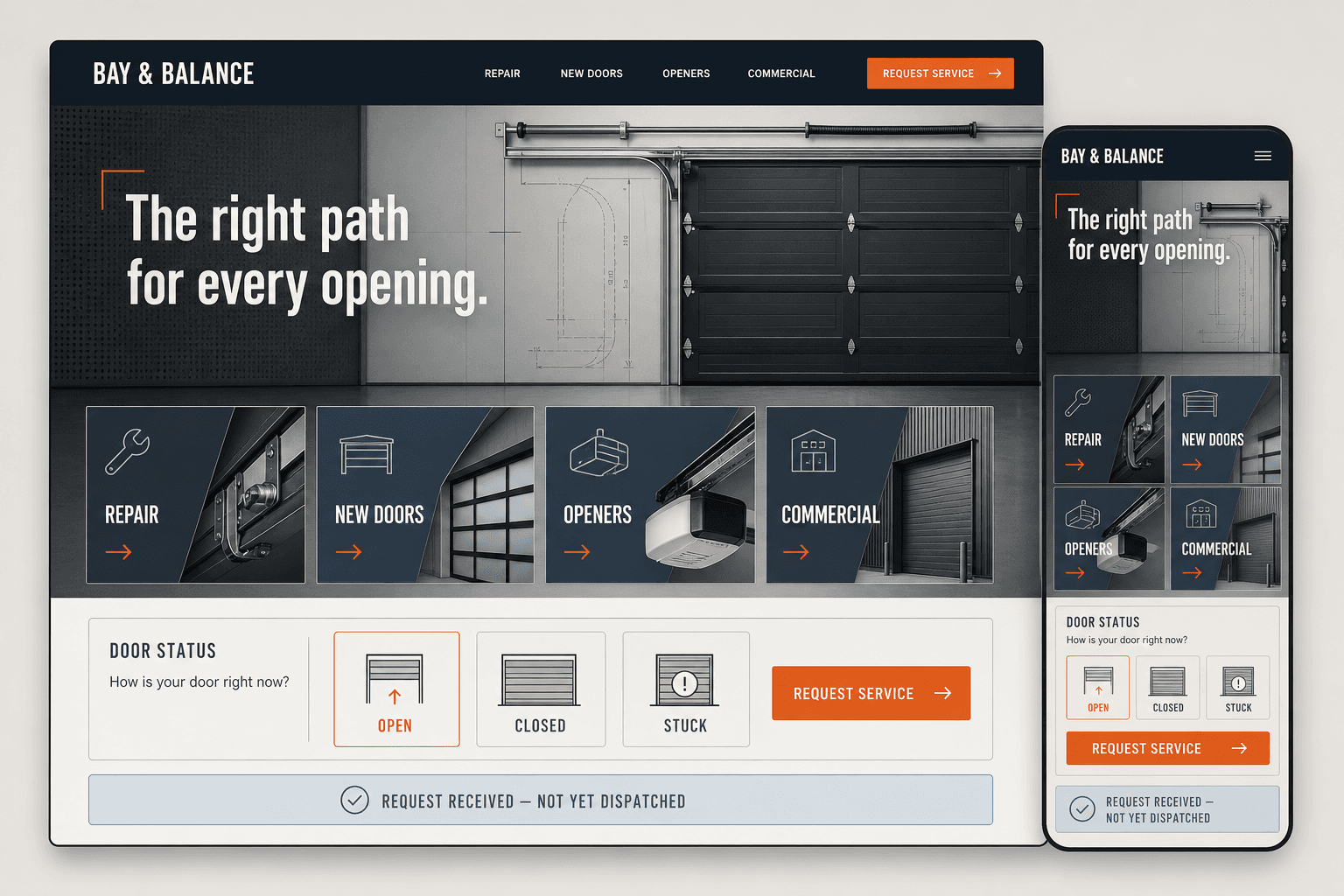
Bay & Balance is a fictional BLUEROCK concept. It separates repair, new doors, openers, and commercial work while making clear that a received request is not yet a dispatch.

View the Bay & Balance Concept
Bay and Balance fictional garage door website concept

Garage door website questions

What pages should a garage door company website include?

Most need a focused homepage, repair and installation paths, opener or supported specialty services, commercial information when applicable, real service areas, verified company information, approved project evidence, process, and contact. Individual repair, product, brand, maintenance, or location pages should exist only when the company genuinely supports them and the page adds useful distinct information.

Should repair and new-door installation use the same form?

Usually they need different questions. A repair visitor may need to describe the current movement, access, observed condition, safety context, and urgency. An installation visitor may need property, opening, style, material, insulation, window, opener, approval, measurement, and timing context.

Can the website diagnose a broken spring or cable?

No. It may collect observations and display approved safety guidance, including instructions not to operate or approach equipment when the company determines that is appropriate. Diagnosis, safe access, repair options, compatibility, scope, and authorization belong to a qualified on-site or otherwise supported process.

Can customers receive an instant garage door estimate?

A planning range or configured product path may be possible when measurements, equipment, condition, options, labor, access, permits, disposal, taxes, fees, assumptions, exclusions, validity, and inspection requirements are clear. It should not be presented as a final repair diagnosis or binding proposal unless the company’s real workflow supports that.

Will a new website guarantee more service calls or rankings?

No. It can improve technical access, service clarity, local relevance, verified proof, mobile contact, and request quality. Competition, proximity, reputation, seasonality, advertising, availability, pricing, dispatch, and follow-up also affect outcomes.
Build the website around equipment the company can inspect, service, document, and stand behind.

Start Your Website